Social Icons

twitterfacebookgoogle pluslinkedinrss feedemail

Thursday, June 2, 2016

HP 650 With 4GB Ram Showing 929MB Usable With Windows 7 32bit Installed

HP 650 With 4GB Ram Showing 929MB Usable With Windows 7 32bit Installed

 [ Edited ]
Hello Admins, Please i have an Hp 650 Notebook PC with 4GB Ram installed but its displaying 929MB usable these are the following details of My PC;

Graphics : Intel(R) HD Graphics 3000
Chip Type: Intel(R) HD Graphics Family
Total Available Video Memory: 272MB
Dedicated Video Memory: 64MB
System Video Memory: 0MB
Shared Video Memory: 208MB

Please help solve this problem, this article is kinda like related to that of a fixed problem on the support center on this link


Thanks and awaiting your urgent reply,
Regards.

Reply
0
Accepted Solution 

Re: HP 650 With 4GB Ram Showing 929MB Usable With Windows 7 32bit Installed

Replies (1)
Provost
DavidPK
Posts: 40,151
Member Since:‎09-24-2010
Message 2 of 2(393 Views)
 

Re: HP 650 With 4GB Ram Showing 929MB Usable With Windows 7 32bit Installed

Hi,

With reference to the link below, this issue is reported to have been fixed by Bios version F.36 ( see the Revision History ) - bios updates are cumulative, so you should just be able to flash the latest version ( F.39 ).


Regards,

DP-K
---------------------------------------------------------------------------

****Click the White thumb to say thanks****
****Please mark Accept As Solution if it solves your problem****
****I don't work for HP****


Microsoft MVP - Windows Experience

Thursday, August 21, 2014

OUTLOOK.COM SERVER SETTINGS

Outlook.com Email Server Settings

Outlook.com is our preferred email hosting provider.

Below are the details you need to configure outlook.com.
*You can always access your email by going to www.outlook.com

Add Outlook.com to Office Outlook

Add Outlook.com to Mac (Macmail)

Macmail as we understand does not support Activesync.  As such you will need to use IMAP to configure.
You have to follow exactly the same procedure as above, except that you need to select IMAP as your email accounttype (and not POP).
Account type: IMAPIncoming mail server: imap-mail.outlook.com
Outgoing mail server (SMTP): smtp-mail.outlook.com

Logon Information:
User Name: your email address
Password: your password
Then click on the “More Settings” button:
Outgoing Server tab: mark the box “My outgoing server (SMTP) requires authentication” and select “use same settings as my incoming mail server”.
Advanced tab – Server Port Numbers:
Incoming server (POP3): port 993
 – you must also mark the box “this server requires an encrypted connection (SSL)”
Outgoing server (SMTP): port 587
 – you must also choose “TLS” for the option “Use the following types of encrypted connection”.
You can use the same Outlook.com IMAP server settings for any other email app, including iOS or Android Email apps.

Add Outlook.com for mobile

Access Outlook.com on your Windows Phone, iPhone, iPad, iPod Touch, or Android.

iPhone, iPad, or iPod Touch

  • Tap Settings, and then tap Mail, Contacts, Calendar.
  • Tap Add Account in the Accounts page.
  • Select Hotmail.
  • Enter your Outlook.com address and password.
  • Select the fields that you want to sync. Tap Save.

Android

You can use Outlook.com on your Android phone or tablet with the free Android app published by Microsoft + SEVEN.
  1. Download the app - Search for Outlook.com in Google Play with your Android device.
  2. Enter your Outlook.com email address and password, and then tap Next.
  3. Choose additional options like sync mail frequency and nickname to use, and then tap Next.
  4. Check/uncheck sync calendar and contacts, and then tap Next.

Windows Phone

  • On Start, flick left to the App list, tap Settings, and then tap Email & accounts.
  • Tap add an account.
  • If you have a Windows Phone 8, tap Outlook.
    – or –
    If you have a Windows Phone 7, tap Windows Live.
  • Enter your Outlook.com address.
  • Tap the Password box, and then enter your Outlook.com password.
  • Tap Sign in.
Other

Outlook.com POP Mail Server Settings

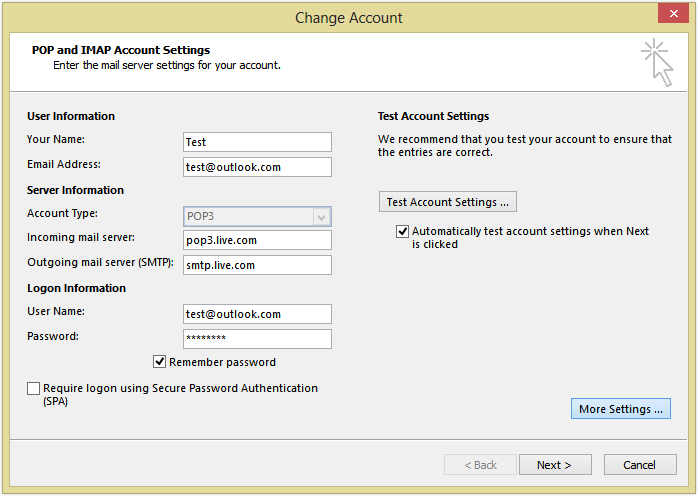
When you add the outlook.com account to Outlook 2013, on the first screen make sure you select “Manual setup or additional server types”. On the next screen, choose “POP or IMAP” and enter the following Outlook.com mail server settings in the Server Information fields:
Account type: POP3
Incoming mail server: pop3.live.com
Outgoing mail server (SMTP): smtp.live.com

Logon Information:
User Name: your @outlook.com email address
Password: your @outlook.com password
outlook.com mail server settings
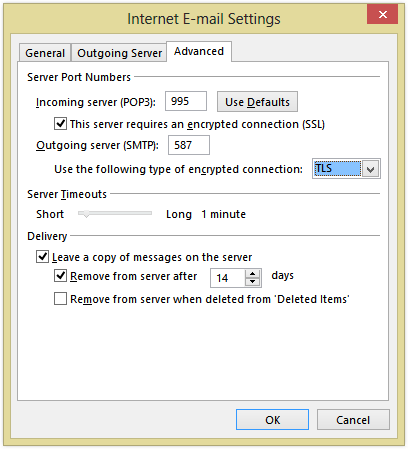
Then click on the “More Settings” button:
Outgoing Server tab: mark the box “My outgoing server (SMTP) requires authentication” and select “use same settings as my incoming mail server”.
Advanced tab – Server Port Numbers:
Incoming server (POP3): port 995
 – you must also mark the box “this server requires an encrypted connection (SSL)”
Outgoing server (SMTP): port 587
 – you must also choose “TLS” for the option “Use the following types of encrypted connection”.
Outlook.com Mail Servers Port
You can use the same Outlook.com POP server settings for any other email app, including iOS or Android Email apps.

Outlook.com Active Sync Settings

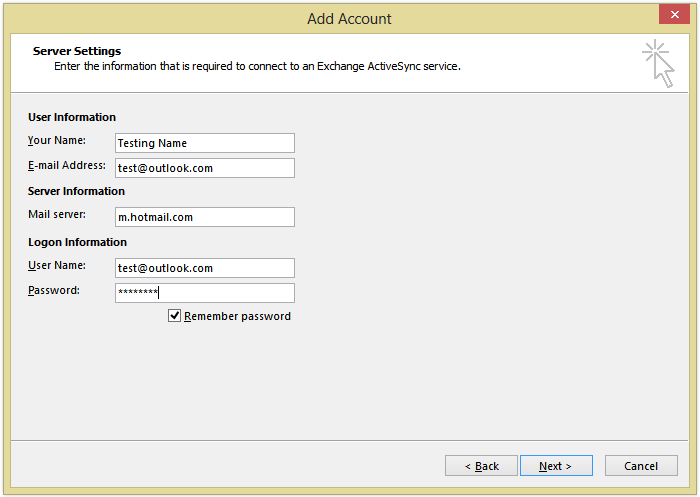
ActiveSync lets you send, receive & synchronize not just your emails, but also your calendar, contacts or tasks. When you add the outlook.com account to Outlook 2013, on the first screen make sure you select “Manual setup or additional server types”. On the next screen, choose “Outlook.com or Exchange ActiveSync compatible service” and enter the following Active Sync server settings:
Mail Server: m.hotmail.com
Also, mark the box to use SSL for the server connection.

User Name: your full @outlook.com email address
Password: your @outlook.com password
Outlook.com Active Sync Server Settings

Overview: Outlook.com Server Settings

The Outlook.com mail server settings are valid for every email client application that supports the POP3, IMAP or Active Sync protocols, no matter the platform (Windows, Mac, iOS, Android, etc).
Outlook.com POP3 servers
Incoming mail serverpop3.live.com
Incoming mail server port995 (SSL required)
Outgoing (SMTP) mail serversmtp.live.com
Outgoing (SMTP) mail server port587 (SSL/TLS required)
Outgoing server (SMTP) authenticationyes, same settings as my incoming mail server
Outlook.com IMAP servers
Incoming mail serverimap-mail.outlook.com
Incoming mail server port993 (SSL required)
Outgoing (SMTP) mail serversmtp-mail.outlook.com
Outgoing (SMTP) mail server port587 (SSL/TLS required)
Outgoing server (SMTP) authenticationyes, same settings as my incoming mail server
Outlook.com via Active Sync
Active Sync mail serverm.hotmail.com (SSL required)

Thursday, August 15, 2013

INTERNET PROTOCOL SUITE

The Internet protocol suite is the networking model and a set of communications protocols used for the Internet and similar networks. It is commonly known as TCP/IP, because its most important protocols, the Transmission Control Protocol (TCP) and the Internet Protocol (IP) were the first networking protocols defined in this standard. It is occasionally known as the DoD model due to the foundational influence of the ARPANET in the 1970s (operated by DARPA, an agency of the United States Department of Defense).
TCP/IP provides end-to-end connectivity specifying how data should be formatted, addressed, transmitted, routed and received at the destination. It has four abstraction layers which are used to sort all related protocols according to the scope of networking involved.[1][2] From lowest to highest, the layers are:
The TCP/IP model and related protocols are maintained by the Internet Engineering Task Force (IETF).

WHAT IS SESSION INITIATION PROTOCOL - SIP?

The Session Initiation Protocol (SIP) is a signaling communications protocol, widely used for controlling multimedia communication sessions such as voice and video calls over Internet Protocol (IP) networks.
The protocol defines the messages that are sent between peers which govern establishment, termination and other essential elements of a call. SIP can be used for creating, modifying and terminating two-party (unicast) or multiparty (multicast) sessions consisting of one or several media streams. Other SIP applications include video conferencing, streaming multimedia distribution, instant messaging, presence information, file transfer, fax over IPand online games.
Originally designed by Henning Schulzrinne and Mark Handley in 1996, SIP has been developed and standardized in RFC 3261 under the auspices of the Internet Engineering Task Force (IETF). It is an application layer protocol designed to be independent of the underlying transport layer; it can run on Transmission Control Protocol (TCP), User Datagram Protocol (UDP) or Stream Control Transmission Protocol (SCTP).[1] It is a text-based protocol, incorporating many elements of the Hypertext Transfer Protocol (HTTP) and the Simple Mail Transfer Protocol (SMTP).[2]
SIP works in conjunction with several other application layer protocols that identify and carry the session media. Media identification and negotiation is achieved with the Session Description Protocol (SDP). For the transmission of media streams (voice, video) SIP typically employs the Real-time Transport Protocol (RTP), which may be secured with the Secure Real-time Transport Protocol (SRTP). For secure transmissions of SIP messages the protocol may be encrypted with Transport Layer Security (TLS).

Monday, July 15, 2013

The Role of ICT in Business Communication

  1. Information and Communication Technology (ICT) provides business communications avenues crucial to remaining competitive in local and global economies. According to the U.S. Census ICT survey, American businesses spent $296.3 billion on ICT equipment in 2008.

    Components

    • ICT includes e-mail, telecommunications and the Internet, and involves the use of computers, telephones, fax machines and copiers, and a variety of mobile communication devices. The term also refers to electronic documents and other content, as well as video communication, software and external drives.

    Significance

    • To compete in the global marketplace, companies use websites to provide ordering information and product lists online, allowing monetary exchange with customers. Websites also allow companies to receive valuable feedback on customer needs and ideas for improvement. Through e-mail, faxes, and telecommunications devices, businesses generate greater accessibility through almost instantaneous communications.

    Considerations

    • To maximize the benefits of ICT in business communications, businesses should incorporate proper infrastructure and employee training to produce proficient workers capable of monitoring and interpreting feedback and understanding the use of e-commerce and software.

The Benefits of Using ICTs in Business & Finance

Information and communication technologies, also known as ICT, include the Internet, phones, cable services, computers, and other hardware and digital technologies that facilitate the transfer of information from one interface to another. ICT is useful in business and finance because it increases the overall amount of information in the marketplace, which helps people make more informed, rational decisions. In other words, the presence of ICT offers multiple avenues for researching information and checking the quality of information before making decisions.

More Information

    • ICT offers more information in the marketplace. General search engines like Google and Yahoo! help organize the information collected about business and finance on the Internet, essentially providing people in business and finance with access to a slew of information. Moreover, those search engines in particular, along with NASDAQ.com and a bevy of other sites, are immediately updated with the latest business and financial information, meaning that ICT increases the quantity and quality of information available at any particular moment in time.

    Better Information

    • ICT allows people to connect with each other and multiple third-party sources to verify information before acting on it. For example, email services, text messaging and direct phone calls allow people to reach one another directly and immediately to verify information, resulting in a higher quality of information overall. Moreover, regarding business and financial news in particular, there's constant competition to provide quality information through ICT (e.g., consider how "The Wall Street Journal," Bloomberg.com, "The Economist," "The New York Times," "The Financial Times," and CBS and Fox News are all competing to be the main providers of business and finance information to the public).

    Better Organization

    • ICT also creates a more organized business. Computers and software suites like Microsoft Office especially help to create order in the workplace. Programs like Microsoft Excel organize data, while Microsoft Outlook or even Google help to keep peoples' engagements and schedules manageable.
      Moreover, mobile devices like the iPhone and BlackBerry help people in business organize their time to the last minute (consider how easy ICT makes it to push a meeting back five or 10 minutes). In general, by enabling people to organize their time better, ICT creates a better-organized world for business and finance to operate in. Since time in business and finance frequently translates literally into money, this is a major benefit.

WHY YOU NEED A PROFESSIONAL EMAIL ADDRESS

Email Address - Is your email address losing you business?
Do you have a professional Email Address? 

Your email address could be turning away new business. We advise that all companies should adopt ‘professional sounding' email addresses. Your email address says a lot about your business. It is very easy to arrange a free or cheap email address these days such as, Google, Yahoo, AOL and HotMail... to name just a few of the service providers who will set up your free or cheap email address in minutes. However many such email addresses do not give a professional impression of your business nor are they always easy for your customers and potential customers to remember. 
 
Does your email address look professional? Is your web hosting company flexible? It is amazing to find that in this day and age, some companies have still not realised how important their email communications are. Your email address may actually be more important to your image than your logo, letterhead or business cards combined! An example of this would be a) sales@yorkshiredecorators.com or b) yorkshiredecorators@hotmail.com

Which email address would you choose a) or b)?
Recent surveys carried out have shown that for instance the first email address of a) sales@yorkshiredecorators.com will suggest a more professional and trustworthy organisation and will inspire persons to actually make contact and make purchases as opposed to the second email address of b) yorkshiredecorators@hotmail.com. 
Having an email address on your own domain not only looks more professional but is also a good advertisement for your company website as your domain name is attached to every email you send.
At one time just having an email address on a business card was impressive because not everyone had an email address let alone knew how to use it as a marketing tool. Gone are those days and to make a first impression you need to use a professional email address. Not only does a professional email address bring more promise and prestige to your company but it is an inexpensive form of marketing. You are able to market your business to many potential clients while at the same time keeping customers informed and up to date through your email correspondence.
  
  Email is an extension of a company’s online presence, so it is unsurprising to find that consumers expect a professional business website to be complemented by domain name specific email addresses.
   
Your email address includes part of your domain name, hence if you register "www.yourcompany.com" you can have email addresses in the form "sales@yourcompany.com" or "info@yourcompany.com"!
A professional e-mail address is defined as one that, represents and reflects the professional interests of the user or owner of the e-mail address itself. A professional e-mail address forms a part of how individuals or organisations actively market their products, services, skills, or professional objectives. A professional e-mail address can also communicate useful, and meaningful information about the owner or user of the email address.

Do you have an email address branded with your business name? Or do you advertise your ISP's services instead? Register your own domain name (yourbusiness.com) and get an email address (you@yourbusiness.com) which better promotes your own business, and provides a more professional image to your clients. Register your domain name with PK IT Consultants Ltd and let us organise a professional email address for you. Our Email service is a professional email service allowing businesses to use a domain name (eg yourbusiness.com) to create an unlimited amount of email accounts such as you@yourbusiness.com or sales@yourbusiness.com. Make the switch now to PK IT Consultants Ltd.
Project a professional image with our reliable email services. Let us help you to choose a professional domain name and set up a professional email address

Why you Need a Website/Domain Name for your Business, Company or Institution

A domain name is your unique address on the Internet. The domain name functions as as your SIM CARD online. Since people remember names better than numbers, domain names help people easily find your website simply by typing your domain name. - (e.g. www.yourcompany.com).
Why should you buy a domain name?
Whether you are a business or an individual, there are several important reasons for buying a domain name:
  • Exposure - Your domain name means that anyone in the world can find information about you, your products or your services 24 hours a day even when you are sleeping!
  • Profitability: Domain names help to establish your Internet point of contact 24 hours every day. However domain names offer many other purposes other than exposure and profitability. 
  • Brand Recognition and Recall - A domain name gives you email addresses customized to your brand e.g yourname@yourcompany.com. More importantly, every email you send is your name. If your customers can recall your company when they think of a need they have, you are more likely to get a referral or a sale.
  • Professionalism - Having our own domain name and customized email address provides a higher level of professionalism and trust; this instills a higher level of integrity to your customers and prospects.
The domain name you choose for your website depends on many factors regarding your business and the purpose for which you're creating that website. From our experience the main reasons you need a website among others are:
  • Provide information about your business/ organization.
  • Market and Sell your products/ services through the internet.
  • Build your brand name for whatever business that you may be running.
Domains
Domains serve as the place you tell people to visit to come to see your website. Depending on the web hosting plan you choose, you can host multiple domains on a single account. You can also point your domains to specific locations or park your domains on a single website. If you have access to host multiple domains and websites, you will also gain email and website statistics for each.
Subdomains
A subdomain gives you the ability to put a prefix before your domain name. An example of this would be photo.yourdomain.com. Webnet provides you with the tools to quickly setup subdomains for your main website and for any other domains you are hosting with us. You also have full access to email and web statistic functionality with each subdomain you create and host at Webnet.
With a domain name using your company's name, you portray a professional image to your customers, prospects and suppliers.
Your personalised emails become your company's business card (for exemple :first.name.surname@your-company-name.com such as pandresile@pkitconsultants.tk ).
Make yourself known, use your domain name to publish your website (for exemple :www.your-company-name.com such as www.pkitconsultants.tk ).
Your domain name might be available today, but it might not be tomorrow. So protect your company's identity now.
To get a Domain Name for your Business, simply Contact Us today and consider it yours!